






Enjoying this article? Add us as a preferred source on Google.
The Steam Frame is an easy buy if you want to play PC VR wirelessly. If you’re hunting for a standalone headset that does everything on its own, sit this one out. At $1,300 it costs roughly twice what a Meta Quest 3 does — and whether that gap is justified is the question this guide answers.
On September 15, 2026, Valve dropped the Steam Frame with essentially no warning. There was no real pre-announcement; one morning it was simply on sale in Japan. My September 15 consisted of waking up, seeing the timeline in full meltdown, and scrolling through it half-asleep.
In Japan the headset isn’t sold directly by Valve. Distribution is handled by KOMODO — the same partner behind the Steam Deck’s Japanese release — through its “KOMODO STATION” storefront. Unlike the lottery-style queue used overseas, Japanese buyers can purchase immediately as long as stock holds. That’s a quietly big deal.
Below, I’ve laid out street pricing, the full spec sheet, how it stacks up against the competition, and — the part that actually matters — how much of your library you can realistically play, all based on information as of September 2026. Give me five minutes before you drop $1,300.
*Prices in this article are converted from Japanese yen at ¥154 = US$1 (September 2026 rate).

How much is the Steam Frame? Should you buy 256GB or 1TB?
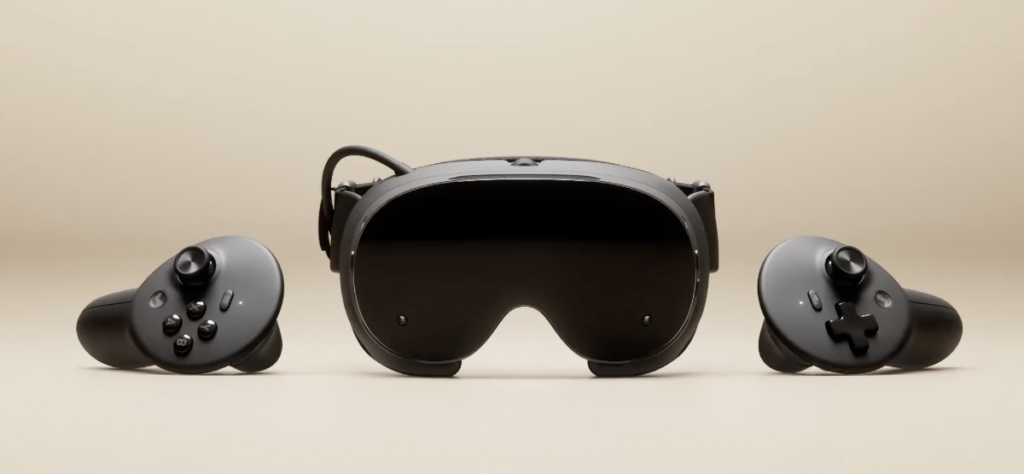
The Steam Frame costs $1,300 for the 256GB model and $1,590 for the 1TB model (Japan pricing via KOMODO, tax included).
That’s a $292 gap for an extra 768GB of storage. Measured purely as cost per gigabyte it’s a perfectly fair deal. The real question is whether VR games will ever eat that much space.
Here’s the short version: if PC VR streaming is your main use case, 256GB is plenty. The Steam Frame’s whole identity is wireless streaming from a host PC, and in that scenario the games live on the PC. The only thing filling up onboard storage is titles you run standalone.
Go 1TB if you don’t own a host PC and plan to run the headset solo, or if you want to throw it in a bag and use it like a console away from home. Just know that standalone performance has hard limits, which I’ll get into below. Choose with your eyes open.
| Model | Price (tax incl.) | Best for |
|---|---|---|
| Steam Frame 256GB | $1,300 | You own a gaming PC and mainly want PC VR |
| Steam Frame 1TB | $1,590 | No PC, standalone use, or taking it on the road |
| Arcturus Vision Camera (sold separately) | $175 | Optional accessory |
Don’t overlook what’s in the box, either. Both models ship with the headset, the Steam Frame controllers, the 6GHz wireless adapter for PC connectivity, and a copy of Half-Life: Alyx. Getting what many consider the greatest VR game ever made bundled from day one is genuinely nice.
What are the Steam Frame’s specs? Is 440g actually light?
The Steam Frame weighs 440g. That’s 75g less than the Meta Quest 3’s 515g, putting it in the lightest class of VR headsets on the market.
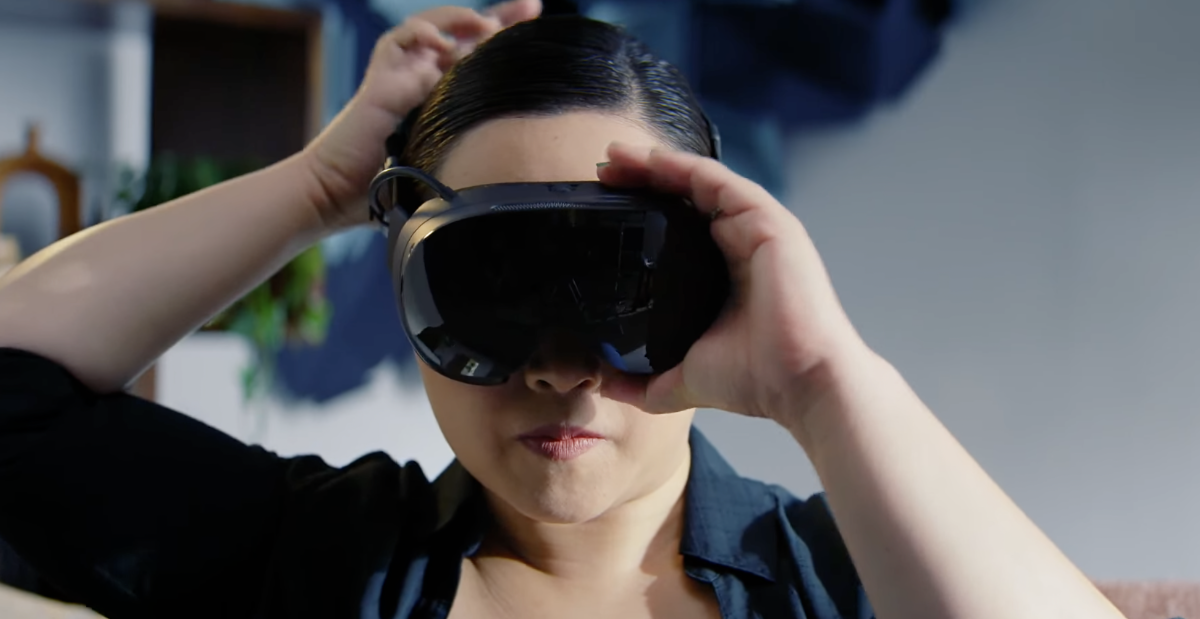
Don’t dismiss those 75 grams. How long you can actually wear a VR headset comes down to weight and balance far more than resolution or raw processing power. Early reviewers have gone as far as saying they could keep it on for 24 hours straight. There’s no top strap — it sits on your face like a pair of diving goggles — and the battery is mounted at the back of the head to balance the front, which is exactly why it works.
Optics are thin pancake lenses with a 110-degree field of view. Two LCD panels deliver 2160×2160 per eye, with a variable refresh rate spanning 72Hz to 144Hz.
| Item | Spec |
|---|---|
| OS | SteamOS 3 (runs standalone) |
| Display | LCD, 2160×2160 pixels per eye |
| Refresh rate | 72–144Hz (variable) |
| Field of view | 110 degrees |
| Lenses | Thin pancake lenses |
| SoC | Qualcomm Snapdragon 8 Gen 3 |
| RAM | 16GB |
| Weight | 440g |
| Battery | 21.6Wh / up to 45W charging over USB-C |
| Tracking | Inside-out tracking plus eye tracking |
| Controllers | 6DoF, haptics, up to 40 hours on one AA battery |
Standard eye tracking is a quietly massive deal
It’s easy to skim past on a spec sheet, but eye tracking as standard equipment deserves a spotlight. No mainstream consumer headset has shipped with it since the Meta Quest Pro back in 2022.
It enables foveated rendering, which draws only the area you’re actually looking at in full resolution and saves the rest of your GPU budget. It also helps compress the bandwidth needed for wireless streaming, which means it’s propping up the single feature the Steam Frame is built around: staying sharp without a cable.
The controllers are getting absurdly good reviews
The bundled controllers are drawing even more praise than the headset itself. They use TMR magnetic sticks, a design that all but eliminates stick drift — the eternal nemesis of VR controllers. Finger tracking is supported as well.
Honestly, praise that unqualified makes me brace for a catch, but the button layout makes sense: ABXY all clustered on the right with a D-pad on the left, essentially a gamepad. That’s by design, because you’re expected to bounce between VR and non-VR games. As someone who got burned by Steam Deck stick drift once already, “TMR magnetic” alone sends my confidence through the roof.

How does the Steam Frame differ from Meta Quest 3 and PSVR2?

The biggest differences are price bracket and philosophy. At $1,300 the Steam Frame bets everything on cutting the cable on PC VR, and it lands at roughly twice the price of a Quest 3.
Line the numbers up and the gap gets brutal.
| Headset | Price (tax incl.) | Key traits |
|---|---|---|
| Steam Frame 256GB | $1,300 | SteamOS / 440g / eye tracking standard |
| Meta Quest 3 (512GB) | $664 | 515g / Quest Store / fully standalone |
| Meta Quest 3S (128GB) | $386 | Cheapest way into modern VR |
| PlayStation VR2 | $435 | Requires a PS5 / wired |
| Valve Index | Discontinued | No official channel left in Japan |
*Quest 3 and 3S prices reflect the April 19, 2026 price revision. The PSVR2 figure is list price after the March 10, 2025 revision and can drop lower during sales. All figures are Japanese retail prices converted to USD.
Against a $386 Quest 3S, the Steam Frame costs more than three times as much. If you just want to try VR, buy the Quest 3S and don’t think twice.
So what justifies the Steam Frame’s existence? Two things: a seamless connection to your existing Steam library and the reassurance of first-party Valve support. Compatibility with the PC VR games you already own is guaranteed, and official SteamVR support is locked in going forward. For Valve Index owners who effectively lost their upgrade path, this is the successor they’ve been waiting years for.
On top of that, the dedicated 6GHz wireless adapter puts the stability of its wireless PC VR link in a different league from headsets that stream over generic Wi-Fi. Whether that’s worth $1,300 to you is the dividing line.
Can you really play non-VR games on the Steam Frame?
You can, but temper your expectations. Right now the gap between what runs and what doesn’t is enormous.
One of Valve’s headline pitches is that non-VR games from your Steam library run on a giant virtual screen. You can install games directly inside the headset, and since the controllers use a gamepad layout, the ideal is a handheld console where the display happens to be strapped to your face.
The reality early reviews describe is rougher. Elden Ring won’t launch at all thanks to anti-cheat, Resident Evil Requiem and Red Dead Redemption 2 reportedly fail to boot, and Final Fantasy XV was unstable even at 720p and 30fps. The PC version of VRChat throws EAC-related errors when launched standalone.
In other words, anti-cheat titles and heavyweight 3D games are close to hopeless in standalone mode. The fix is to stream them from a host PC instead.
Flip that around and the picture changes completely if you do have a host PC — anything that runs there can basically be beamed over. Two years with a Steam Deck taught me I’d end up living on indies and 2D games anyway, so asking a device like this to run blockbusters was always the wrong ask.
What are the Steam Frame’s downsides? Weak points to know before buying
The biggest weakness is standalone performance. Run it solo and even the pack-in flagship, Half-Life: Alyx, is hard to call comfortable.
Early reviews report that the only things running smoothly in PC VR compatibility mode were Beat Saber and Rez Infinite’s wireframe-style mode. Even titles listed as verified reportedly failed to launch in case after case.
A game running and a game being enjoyable are two different things, and you can’t call it comfortable to play when the image smears and ghosts every time your view shifts even slightly
Source:AUTOMATON
That’s a fair hit. The fact that the bundled Half-Life: Alyx boots standalone at all is technically remarkable, but with shimmer and ghosting layered over it you’re not experiencing the game as designed. If you want Alyx at its best, stream it from your PC.
Other things to watch out for
- Glasses barely fit — the compact build makes it hard to seat glasses even with the spacer installed. Glasses wearers, take note
- Japanese keyboard bug — using a Japanese keyboard can turn your input into a string of numbers
- The price — $1,300 is firmly premium for a VR headset, and factoring in a gaming PC pushes the total much higher
- Built around a host PC — if you want something that stands on its own, a Quest 3 will simply satisfy you more
On the plus side, it comes down to five things: the 440g weight, high-quality controllers with TMR magnetic sticks, a rock-solid wireless PC VR link via the dedicated dongle, standard eye tracking, and the confidence that Valve’s official support isn’t going anywhere.
Put simply, the Steam Frame is hardware for people who already own a gaming PC and a Steam library and want to set them loose wirelessly. Buy it for any other reason and you’ll regret it. Back when I worked the counter at an otaku shop, I watched plenty of customers buy on spec sheets alone and end up with gear they couldn’t use, so I’ll say this one loudly.

Enjoying this article? Add us as a preferred source on Google.
Verdict: who should actually buy the Steam Frame?
To repeat the conclusion: if you own a gaming PC and want wireless PC VR, the Steam Frame is a buy. For everyone else, I can’t fully recommend it yet.
Pricing is $1,300 for the 256GB model and $1,590 for the 1TB model (Japan pricing via KOMODO, tax included). Japanese sales run through KOMODO’s “KOMODO STATION,” and unlike the overseas lottery queue you can buy instantly while stock lasts. Both models include the headset, controllers, the 6GHz wireless adapter, and Half-Life: Alyx. The Arcturus Vision Camera is $175 separately.
On specs: 440g (75g lighter than a Quest 3), 2160×2160 LCD per eye, variable 72–144Hz, a 110-degree field of view, Snapdragon 8 Gen 3 with 16GB of RAM, and eye tracking as standard. As a piece of hardware, it’s exceptionally well executed.
Standalone performance, though, has hard limits. Anti-cheat titles almost universally refuse to launch, and heavyweight 3D games struggle. Even Half-Life: Alyx running solo suffers from ghosting. Factor that in before you decide.
And against the competition: the Quest 3S is $386, the Quest 3 (512GB) is $664, and PSVR2 is $435. If you’re still in the “I want to try VR” phase, those are the smarter purchases. The Steam Frame’s $1,300 is an investment for people who already own the asset that is a Steam library.
The Steam Frame isn’t a VR starter kit for everyone — it’s the endgame weapon for PC VR devotees. The craftsmanship on display, from the 440g frame to the TMR magnetic-stick controllers, proves Valve was serious about building a true Index successor. On the other side of the ledger, standalone performance can’t even run its own flagship comfortably, so expecting a $1,300 all-in-one will leave you burned. This is gear that assumes a gaming PC and a Steam library are already in place.
Got a host PC? Buy it. If you don’t, start with a $386 Quest 3S instead.
*Prices and specifications in this article reflect information as of September 2026. Stock and pricing can change, so check the official store for the latest details before buying.
Read Next

Nokko Oda














Leave a Reply